> ## Documentation Index
> Fetch the complete documentation index at: https://upstash-fix-issues-on-docs.mintlify.site/llms.txt
> Use this file to discover all available pages before exploring further.
# REST API
REST API enables you to access your Upstash database using REST.
## Get Started
If you do not have a database already, follow
[these steps](../overall/getstarted) to create one.
In the database details section of the
[Upstash Console](https://console.upstash.com), click the `REST API` button.
Copy the REST URL and the authentication token. Send an HTTP GET request to the
provided URL by adding an `Authorization: Bearer $TOKEN` header.
```shell
curl https://us1-merry-cat-32748.upstash.io/set/foo/bar \
-H "Authorization: Bearer 2553feg6a2d9842h2a0gcdb5f8efe9934"
```
The above script executes a `SET foo bar` command. It will return a JSON
response:
```json
{ "result": "OK" }
```
You can also set the token as `_token` request parameter as below:
```shell
curl https://us1-merry-cat-32748.upstash.io/set/foo/bar?_token=2553feg6a2d9842h2a0gcdb5f8efe9934
```
## API Semantics
Upstash REST API follows the same convention with
[Redis Protocol](https://redis.io/commands). Give the command name and
parameters in the same order as Redis protocol by separating them with a `/`.
```shell
curl REST_URL/COMMAND/arg1/arg2/../argN
```
Here are some examples:
* `SET foo bar` -> `REST_URL/set/foo/bar`
* `SET foo bar EX 100` -> `REST_URL/set/foo/bar/EX/100`
* `GET foo` -> `REST_URL/get/foo`
* `MGET foo1 foo2 foo3` -> `REST_URL/mget/foo1/foo2/foo3`
* `HGET employee:23381 salary` -> `REST_URL/hget/employee:23381/salary`
* `ZADD teams 100 team-x 90 team-y` ->
`REST_URL/zadd/teams/100/team-x/90/team-y`
#### JSON or Binary Value
To post a JSON or a binary value, you can use an HTTP POST request and set value
as the request body:
```shell
curl -X POST -d '$VALUE' https://us1-merry-cat-32748.upstash.io/set/foo \
-H "Authorization: Bearer 2553feg6a2d9842h2a0gcdb5f8efe9934"
```
In the example above, `$VALUE` sent in request body is appended to the command
as `REST_URL/set/foo/$VALUE`.
Please note that when making a POST request to the Upstash REST API, the request
body is appended as the last parameter of the Redis command. If there are
additional parameters in the Redis command after the value, you should include
them as query parameters in the request:
```shell
curl -X POST -d '$VALUE' https://us1-merry-cat-32748.upstash.io/set/foo?EX=100 \
-H "Authorization: Bearer 2553feg6a2d9842h2a0gcdb5f8efe9934"
```
Above command is equivalent to `REST_URL/set/foo/$VALUE/EX/100`.
#### POST Command in Body
Alternatively, you can send the whole command in the request body as a single
JSON array. Array's first element must be the command name and command
parameters should be appended next to each other in the same order as Redis
protocol.
```shell
curl -X POST -d '[COMMAND, ARG1, ARG2,.., ARGN]' REST_URL
```
For example, Redis command `SET foo bar EX 100` can be sent inside the request
body as:
```shell
curl -X POST -d '["SET", "foo", "bar", "EX", 100]' https://us1-merry-cat-32748.upstash.io \
-H "Authorization: Bearer 2553feg6a2d9842h2a0gcdb5f8efe9934"
```
## HTTP Codes
* `200 OK`: When request is accepted and successfully executed.
* `400 Bad Request`: When there's a syntax error, an invalid/unsupported command
is sent or command execution fails.
* `401 Unauthorized`: When authentication fails; auth token is missing or
invalid.
* `405 Method Not Allowed`: When an unsupported HTTP method is used. Only
`HEAD`, `GET`, `POST` and `PUT` methods are allowed.
## Response
REST API returns a JSON response. When command execution is successful, response
JSON will have a single `result` field and its value will contain the Redis
response. It can be either;
* a `null` value
```json
{ "result": null }
```
* an integer
```json
{ "result": 137 }
```
* a string
```json
{ "result": "value" }
```
* an array value:
```json
{ "result": ["value1", null, "value2"] }
```
If command is rejected or fails, response JSON will have a single `error` field
with a string value explaining the failure:
```json
{"error":"WRONGPASS invalid password"}
{"error":"ERR wrong number of arguments for 'get' command"}
```
### Base64 Encoded Responses
If the response contains an invalid utf-8 character, it will be replaced with
a � (Replacement character U+FFFD). This can happen when you are using binary
operations like `BITOP NOT` etc.
If you prefer the raw response in base64 format, you can achieve this by setting
the `Upstash-Encoding` header to `base64`. In this case, all strings in the response
will be base64 encoded, except for the "OK" response.
```shell
curl https://us1-merry-cat-32748.upstash.io/SET/foo/bar \
-H "Authorization: Bearer 2553feg6a2d9842h2a0gcdb5f8efe9934" \
-H "Upstash-Encoding: base64"
# {"result":"OK"}
curl https://us1-merry-cat-32748.upstash.io/GET/foo \
-H "Authorization: Bearer 2553feg6a2d9842h2a0gcdb5f8efe9934" \
-H "Upstash-Encoding: base64"
# {"result":"YmFy"}
```
## Pipelining
Upstash REST API provides support for command pipelining, allowing you to send
multiple commands as a batch instead of sending them individually and waiting
for responses. With the pipeline API, you can include several commands in a
single HTTP request, and the response will be a JSON array. Each item in the
response array corresponds to the result of a command in the same order as they
were included in the pipeline.
API endpoint for command pipelining is `/pipeline`. Pipelined commands should be
send as a two dimensional JSON array in the request body, each row containing
name of the command and its arguments.
**Request syntax**:
```shell
curl -X POST https://us1-merry-cat-32748.upstash.io/pipeline \
-H "Authorization: Bearer $TOKEN" \
-d '
[
["CMD_A", "arg0", "arg1", ..., "argN"],
["CMD_B", "arg0", "arg1", ..., "argM"],
...
]
'
```
**Response syntax**:
```json
[{"result":"RESPONSE_A"},{"result":"RESPONSE_B"},{"error":"ERR ..."}, ...]
```
Execution of the pipeline is *not atomic*. Even though each command in the
pipeline will be executed in order, commands sent by other clients can
interleave with the pipeline. Use [transactions](#transactions) API instead if
you need atomicity.
For example you can write the `curl` command below to send following Redis
commands using pipeline:
```redis
SET key1 valuex
SETEX key2 13 valuez
INCR key1
ZADD myset 11 item1 22 item2
```
```shell
curl -X POST https://us1-merry-cat-32748.upstash.io/pipeline \
-H "Authorization: Bearer 2553feg6a2d9842h2a0gcdb5f8efe9934" \
-d '
[
["SET", "key1", "valuex"],
["SETEX", "key2", 13, "valuez"],
["INCR", "key1"],
["ZADD", "myset", 11, "item1", 22, "item2"]
]
'
```
And pipeline response will be:
```json
[
{ "result": "OK" },
{ "result": "OK" },
{ "error": "ERR value is not an int or out of range" },
{ "result": 2 }
]
```
You can use pipelining when;
* You need more throughput, since pipelining saves from multiple round-trip
times. (*But beware that latency of each command in the pipeline will be equal
to the total latency of the whole pipeline.*)
* Your commands are independent of each other, response of a former command is
not needed to submit a subsequent command.
## Transactions
Upstash REST API supports transactions to execute multiple commands atomically.
With transactions API, several commands are sent using a single HTTP request,
and a single JSON array response is returned. Each item in the response array
corresponds to the command in the same order within the transaction.
API endpoint for transaction is `/multi-exec`. Transaction commands should be
send as a two dimensional JSON array in the request body, each row containing
name of the command and its arguments.
**Request syntax**:
```shell
curl -X POST https://us1-merry-cat-32748.upstash.io/multi-exec \
-H "Authorization: Bearer $TOKEN" \
-d '
[
["CMD_A", "arg0", "arg1", ..., "argN"],
["CMD_B", "arg0", "arg1", ..., "argM"],
...
]
'
```
**Response syntax**:
In case when transaction is succesful, multiple responses corresponding to each
command is returned in json as follows:
```json
[{"result":"RESPONSE_A"},{"result":"RESPONSE_B"},{"error":"ERR ..."}, ...]
```
If transaction is discarded as a whole, a single error is returned in json as
follows:
```json
{ "error": "ERR ..." }
```
A transaction might be discarded in following cases:
* There is a syntax error on the transaction request.
* At least one of the commands is unsupported.
* At least one of the commands exceeds the
[max request size](../troubleshooting/max_request_size_exceeded).
* At least one of the commands exceeds the
[daily request limit](../troubleshooting/max_daily_request_limit).
Note that a command may still fail even if it is a supported and valid command.
In that case, all commands will be executed. Upstash Redis will not stop the
processing of commands. This is to provide same semantics with Redis when there
are
[errors inside a transaction](https://redis.io/docs/manual/transactions/#errors-inside-a-transaction).
**Example**:
You can write the `curl` command below to send following Redis commands using
REST transaction API:
```
MULTI
SET key1 valuex
SETEX key2 13 valuez
INCR key1
ZADD myset 11 item1 22 item2
EXEC
```
```shell
curl -X POST https://us1-merry-cat-32748.upstash.io/multi-exec \
-H "Authorization: Bearer 2553feg6a2d9842h2a0gcdb5f8efe9934" \
-d '
[
["SET", "key1", "valuex"],
["SETEX", "key2", 13, "valuez"],
["INCR", "key1"],
["ZADD", "myset", 11, "item1", 22, "item2"]
]
'
```
And transaction response will be:
```json
[
{ "result": "OK" },
{ "result": "OK" },
{ "error": "ERR value is not an int or out of range" },
{ "result": 2 }
]
```
## Security and Authentication
You need to add a header to your API requests as `Authorization: Bearer $TOKEN`
or set the token as a url parameter `_token=$TOKEN`.
```shell
curl -X POST https://us1-merry-cat-32748.upstash.io/info \
-H "Authorization: Bearer 2553feg6a2d9842h2a0gcdb5f8efe9934"
```
OR
```shell
curl -X POST https://us1-merry-cat-32748.upstash.io/info?_token=2553feg6a2d9842h2a0gcdb5f8efe9934
```
Upstash by default provides two separate access tokens per database: "Standard"
and "Read Only".
* **Standard** token has full privilege over the database, can execute any
command.
* **Read Only** token permits access to the read commands only. Some powerful
read commands (e.g. SCAN, KEYS) are also restricted with read only token. It
makes sense to use *Read Only* token when you access Upstash Redis from web
and mobile clients where the token is exposed to public.
You can get/copy the tokens by clicking copy button next to
`UPSTASH_REDIS_REST_TOKEN` in REST API section of the console. For the *Read
Only* token, just enable the "Read-Only Token" switch.
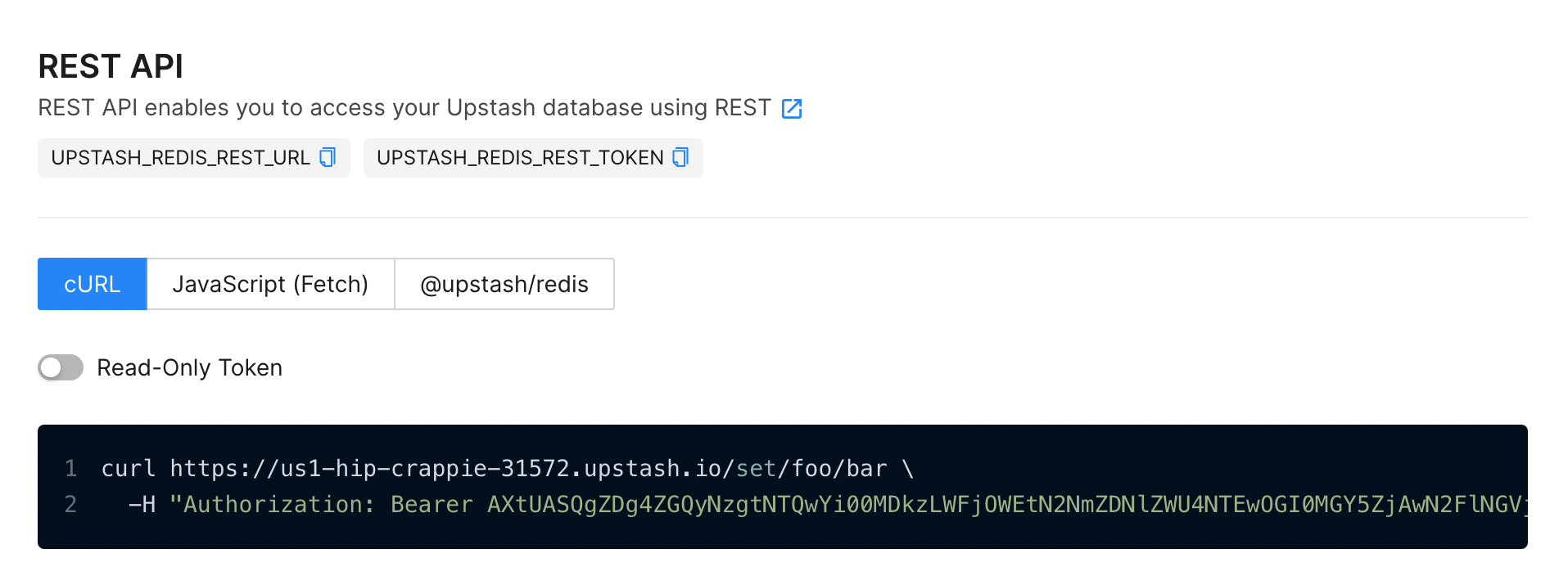 Do not expose your *Standard* token publicly. *Standard* token has full
privilege over the database. You can expose the *Read Only* token as it has
access to read commands only. You can revoke both *Standard* and *Read Only*
tokens by resetting password of your database.
### REST Token for ACL Users
In addition to the tokens provided by default, you can create REST tokens for
the users created via [`ACL SETUSER`](https://redis.io/commands/acl-setuser/)
command. Upstash provides a custom `ACL` subcommand to generate REST tokens:
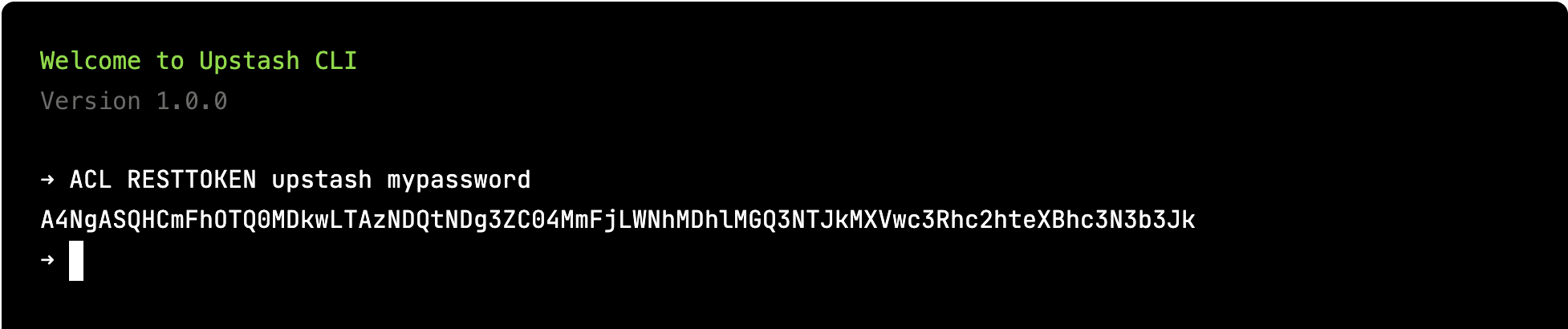
`ACL RESTTOKEN`. It expects two arguments; username and user's password. And
returns the REST token for the user as a string response.
```
ACL RESTTOKEN
Generate a REST token for the specified username & password.
Token will have the same permissions with the user.
```
You can execute `ACL RESTTOKEN` command via `redis-cli`:
```shell
redis-cli> ACL RESTTOKEN default 35fedg8xyu907d84af29222ert
"AYNgAS2553feg6a2d9842h2a0gcdb5f8efe9934DQ="
```
Or via CLI on the Upstash console:
Do not expose your *Standard* token publicly. *Standard* token has full
privilege over the database. You can expose the *Read Only* token as it has
access to read commands only. You can revoke both *Standard* and *Read Only*
tokens by resetting password of your database.
### REST Token for ACL Users
In addition to the tokens provided by default, you can create REST tokens for
the users created via [`ACL SETUSER`](https://redis.io/commands/acl-setuser/)
command. Upstash provides a custom `ACL` subcommand to generate REST tokens:
`ACL RESTTOKEN`. It expects two arguments; username and user's password. And
returns the REST token for the user as a string response.
```
ACL RESTTOKEN
Generate a REST token for the specified username & password.
Token will have the same permissions with the user.
```
You can execute `ACL RESTTOKEN` command via `redis-cli`:
```shell
redis-cli> ACL RESTTOKEN default 35fedg8xyu907d84af29222ert
"AYNgAS2553feg6a2d9842h2a0gcdb5f8efe9934DQ="
```
Or via CLI on the Upstash console:
 If the user doesn't exist or password doesn't match then an error will be
returned.
```shell
redis-cli> ACL RESTTOKEN upstash fakepass
(error) ERR Wrong password or user "upstash" does not exist
```
## Optimizing Performance (for advanced users)
In our internal tests, we have observed that the latency overhead of using the
Upstash REST API compared to the native Redis API is less than 1 millisecond.
However, if low latency is a critical requirement for your use case, you can
further improve the latency by connecting directly to the database port.
Connecting directly to the database port allows for a more direct and optimized
communication path, which can potentially reduce latency even further. By
bypassing the additional network layers involved in REST API communication, you
can achieve lower response times.
It's important to note that there is a trade-off when connecting directly to the
database port, as some environments, like CloudFlare Workers, may restrict
client access to ports other than the standard ones (e.g., 80 and 443). In such
cases, using the Upstash REST API becomes the preferred method for accessing the
database.
Consider your specific requirements, network restrictions, and performance needs
when deciding whether to connect to the database port directly or use the REST
API.
You can use the same url with two changes.
* Append the database port to the url.
* If TLS is disabled, use http instead of https.
Optimized Redis URL (TLS enabled):
```shell
curl https://us1-merry-cat-32748.upstash.io:32748/set/foo/bar \
-H "Authorization: Bearer 2553feg6a2d9842h2a0gcdb5f8efe9934"
```
Optimized Redis URL (TLS disabled):
```shell
curl http://us1-merry-cat-32748.upstash.io:32748/set/foo/bar \
-H "Authorization: Bearer 2553feg6a2d9842h2a0gcdb5f8efe9934"
```
## Redis Protocol vs REST API
### REST API Pros
* If you want to access to Upstash database from an environment like CloudFlare
Workers, WebAssembly, Fastly Compute\@Edge then you can not use Redis protocol
as it is based on TCP. You can use REST API in those environments.
* REST API is request (HTTP) based where Redis protocol is connection based. If
you are running serverless functions (AWS Lambda etc), you may need to manage
the Redis client's connections. REST API does not have such an issue.
* Redis protocol requires Redis clients. On the other hand, REST API is
accessible with any HTTP client.
### Redis Protocol Pros
* If you have legacy code that relies on Redis clients, the Redis protocol
allows you to utilize Upstash without requiring any modifications to your
code.
* By leveraging the Redis protocol, you can take advantage of the extensive
Redis ecosystem. For instance, you can seamlessly integrate your Upstash
database as a session cache for your Express application.
## REST API vs GraphQL API
The REST API generally exhibits lower latency compared to the GraphQL API. In
the case of the REST API, direct access to the database is established. However,
with the GraphQL API, a proxy layer is present, responsible for accepting
connections and translating GraphQL queries into the Redis protocol.
If you do not have a specific GraphQL use case, we recommend REST API instead
of GraphQL API. We plan to deprecate the GraphQL API in future releases.
## Cost and Pricing
Upstash pricing is based on per command/request. So the same pricing listed in
our [pricing](https://upstash.com/pricing/redis) applies to your REST calls too.
## Metrics and Monitoring
In the current version, we do not expose any metrics specific to API calls in
the console. But the metrics of the database backing the API should give a good
summary about the performance of your APIs.
## REST - Redis API Compatibility
| Feature | REST Support? | Notes |
| ------------------------------------------------------------- | :-----------: | :---------------------------------------------------------------: |
| [String](https://redis.io/commands/?group=string) | ✅ | |
| [Bitmap](https://redis.io/commands/?group=bitmap) | ✅ | |
| [Hash](https://redis.io/commands/?group=hash) | ✅ | |
| [List](https://redis.io/commands/?group=list) | ✅ | Blocking commands (BLPOP - BRPOP - BRPOPLPUSH) are not supported. |
| [Set](https://redis.io/commands/?group=set) | ✅ | |
| [SortedSet](https://redis.io/commands/?group=sorted_set) | ✅ | Blocking commands (BZPOPMAX - BZPOPMIN) are not supported. |
| [Geo](https://redis.io/commands/?group=geo) | ✅ | |
| [HyperLogLog](https://redis.io/commands/?group=hyperloglog) | ✅ | |
| [Transactions](https://redis.io/commands/?group=transactions) | ✅ | WATCH/UNWATCH/DISCARD are not supported |
| [Generic](https://redis.io/commands/?group=generic) | ✅ | |
| [Server](https://redis.io/commands/?group=server) | ✅ | |
| [Scripting](https://redis.io/commands/?group=scripting) | ✅ | |
| [Pub/Sub](https://redis.io/commands/?group=pubsub) | ⚠️ | Only PUBLISH and PUBSUB are supported. |
| [Connection](https://redis.io/commands/?group=connection) | ⚠️ | Only PING and ECHO are supported. |
| [JSON](https://redis.io/commands/?group=json) | ✅ | |
| [Streams](https://redis.io/commands/?group=stream) | ✅ | |
| [Cluster](https://redis.io/commands#cluster) | ❌ | |
If the user doesn't exist or password doesn't match then an error will be
returned.
```shell
redis-cli> ACL RESTTOKEN upstash fakepass
(error) ERR Wrong password or user "upstash" does not exist
```
## Optimizing Performance (for advanced users)
In our internal tests, we have observed that the latency overhead of using the
Upstash REST API compared to the native Redis API is less than 1 millisecond.
However, if low latency is a critical requirement for your use case, you can
further improve the latency by connecting directly to the database port.
Connecting directly to the database port allows for a more direct and optimized
communication path, which can potentially reduce latency even further. By
bypassing the additional network layers involved in REST API communication, you
can achieve lower response times.
It's important to note that there is a trade-off when connecting directly to the
database port, as some environments, like CloudFlare Workers, may restrict
client access to ports other than the standard ones (e.g., 80 and 443). In such
cases, using the Upstash REST API becomes the preferred method for accessing the
database.
Consider your specific requirements, network restrictions, and performance needs
when deciding whether to connect to the database port directly or use the REST
API.
You can use the same url with two changes.
* Append the database port to the url.
* If TLS is disabled, use http instead of https.
Optimized Redis URL (TLS enabled):
```shell
curl https://us1-merry-cat-32748.upstash.io:32748/set/foo/bar \
-H "Authorization: Bearer 2553feg6a2d9842h2a0gcdb5f8efe9934"
```
Optimized Redis URL (TLS disabled):
```shell
curl http://us1-merry-cat-32748.upstash.io:32748/set/foo/bar \
-H "Authorization: Bearer 2553feg6a2d9842h2a0gcdb5f8efe9934"
```
## Redis Protocol vs REST API
### REST API Pros
* If you want to access to Upstash database from an environment like CloudFlare
Workers, WebAssembly, Fastly Compute\@Edge then you can not use Redis protocol
as it is based on TCP. You can use REST API in those environments.
* REST API is request (HTTP) based where Redis protocol is connection based. If
you are running serverless functions (AWS Lambda etc), you may need to manage
the Redis client's connections. REST API does not have such an issue.
* Redis protocol requires Redis clients. On the other hand, REST API is
accessible with any HTTP client.
### Redis Protocol Pros
* If you have legacy code that relies on Redis clients, the Redis protocol
allows you to utilize Upstash without requiring any modifications to your
code.
* By leveraging the Redis protocol, you can take advantage of the extensive
Redis ecosystem. For instance, you can seamlessly integrate your Upstash
database as a session cache for your Express application.
## REST API vs GraphQL API
The REST API generally exhibits lower latency compared to the GraphQL API. In
the case of the REST API, direct access to the database is established. However,
with the GraphQL API, a proxy layer is present, responsible for accepting
connections and translating GraphQL queries into the Redis protocol.
If you do not have a specific GraphQL use case, we recommend REST API instead
of GraphQL API. We plan to deprecate the GraphQL API in future releases.
## Cost and Pricing
Upstash pricing is based on per command/request. So the same pricing listed in
our [pricing](https://upstash.com/pricing/redis) applies to your REST calls too.
## Metrics and Monitoring
In the current version, we do not expose any metrics specific to API calls in
the console. But the metrics of the database backing the API should give a good
summary about the performance of your APIs.
## REST - Redis API Compatibility
| Feature | REST Support? | Notes |
| ------------------------------------------------------------- | :-----------: | :---------------------------------------------------------------: |
| [String](https://redis.io/commands/?group=string) | ✅ | |
| [Bitmap](https://redis.io/commands/?group=bitmap) | ✅ | |
| [Hash](https://redis.io/commands/?group=hash) | ✅ | |
| [List](https://redis.io/commands/?group=list) | ✅ | Blocking commands (BLPOP - BRPOP - BRPOPLPUSH) are not supported. |
| [Set](https://redis.io/commands/?group=set) | ✅ | |
| [SortedSet](https://redis.io/commands/?group=sorted_set) | ✅ | Blocking commands (BZPOPMAX - BZPOPMIN) are not supported. |
| [Geo](https://redis.io/commands/?group=geo) | ✅ | |
| [HyperLogLog](https://redis.io/commands/?group=hyperloglog) | ✅ | |
| [Transactions](https://redis.io/commands/?group=transactions) | ✅ | WATCH/UNWATCH/DISCARD are not supported |
| [Generic](https://redis.io/commands/?group=generic) | ✅ | |
| [Server](https://redis.io/commands/?group=server) | ✅ | |
| [Scripting](https://redis.io/commands/?group=scripting) | ✅ | |
| [Pub/Sub](https://redis.io/commands/?group=pubsub) | ⚠️ | Only PUBLISH and PUBSUB are supported. |
| [Connection](https://redis.io/commands/?group=connection) | ⚠️ | Only PING and ECHO are supported. |
| [JSON](https://redis.io/commands/?group=json) | ✅ | |
| [Streams](https://redis.io/commands/?group=stream) | ✅ | |
| [Cluster](https://redis.io/commands#cluster) | ❌ | |