> ## Documentation Index
> Fetch the complete documentation index at: https://upstash-fix-issues-on-docs.mintlify.site/llms.txt
> Use this file to discover all available pages before exploring further.
# Connect Your Client
Upstash works with Redis® API, that means you can use any Redis client with
Upstash. At the [Redis Clients](https://redis.io/clients) page you can find the
list of Redis clients in different languages.
Probably, the easiest way to connect to your database is to use `redis-cli`.
Because it is already covered in [Getting Started](../overall/getstarted), we
will skip it here.
## Database
After completing the [getting started](../overall/getstarted) guide, you will
see the database page as below:
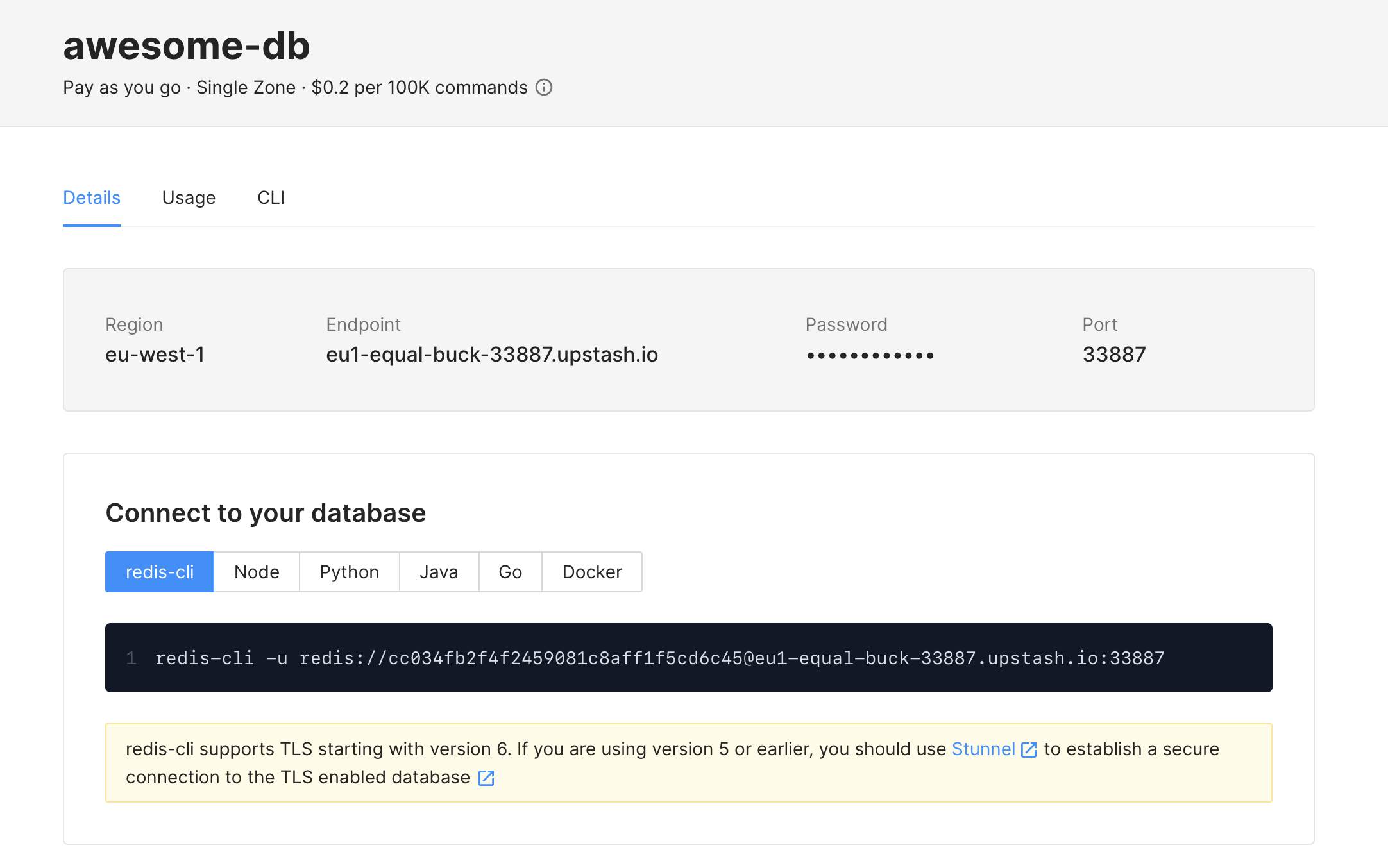 The information required for Redis clients is displayed here as **Endpoint**,
**Port** and **Password**. Also when you click on `Connect` button, you can copy
the code that is required for your client.
Below, we will provide examples from popular Redis clients, but the information above should help you configure all Redis clients similarly.
If you have enabled TLS in your database, please refer to [Connect With
TLS](../howto/connectwithtls) section instead.
## upstash-redis
Because upstash-redis is HTTP based, we recommend it for Serverless functions.
Other TCP based clients can cause connection problems in highly concurrent use
cases.
**Library**: [upstash-redis](https://github.com/upstash/upstash-redis)
**Example**:
```typescript
import { Redis } from "@upstash/redis";
const redis = new Redis({
url: "UPSTASH_REDIS_REST_URL",
token: "UPSTASH_REDIS_REST_TOKEN",
});
(async () => {
try {
const data = await redis.get("key");
console.log(data);
} catch (error) {
console.error(error);
}
})();
```
## Node.js
**Library**: [ioredis](https://github.com/luin/ioredis)
**Example**:
```javascript
const Redis = require("ioredis");
let client = new Redis("redis://:YOUR_PASSWORD@YOUR_ENDPOINT:YOUR_PORT");
await client.set("foo", "bar");
let x = await client.get("foo");
console.log(x);
```
## Python
**Library**: [redis-py](https://github.com/andymccurdy/redis-py)
**Example**:
```python
import redis
r = redis.Redis(
host= 'YOUR_ENDPOINT',
port= 'YOUR_PORT',
password= 'YOUR_PASSWORD')
r.set('foo','bar')
print(r.get('foo'))
```
## Java
**Library**: [jedis](https://github.com/xetorthio/jedis)
**Example**:
```java
Jedis jedis = new Jedis("YOUR_ENDPOINT", "YOUR_PORT");
jedis.auth("YOUR_PASSWORD");
jedis.set("foo", "bar");
String value = jedis.get("foo");
System.out.println(value);
```
## Go
**Library**: [redigo](https://github.com/gomodule/redigo)
**Example**:
```go
func main() {
c, err := redis.Dial("tcp", "YOUR_ENDPOINT:YOUR_PORT")
if err != nil {
panic(err)
}
_, err = c.Do("AUTH", "YOUR_PASSWORD")
if err != nil {
panic(err)
}
_, err = c.Do("SET", "foo", "bar")
if err != nil {
panic(err)
}
value, err := redis.String(c.Do("GET", "foo"))
if err != nil {
panic(err)
}
println(value)
}
```
The information required for Redis clients is displayed here as **Endpoint**,
**Port** and **Password**. Also when you click on `Connect` button, you can copy
the code that is required for your client.
Below, we will provide examples from popular Redis clients, but the information above should help you configure all Redis clients similarly.
If you have enabled TLS in your database, please refer to [Connect With
TLS](../howto/connectwithtls) section instead.
## upstash-redis
Because upstash-redis is HTTP based, we recommend it for Serverless functions.
Other TCP based clients can cause connection problems in highly concurrent use
cases.
**Library**: [upstash-redis](https://github.com/upstash/upstash-redis)
**Example**:
```typescript
import { Redis } from "@upstash/redis";
const redis = new Redis({
url: "UPSTASH_REDIS_REST_URL",
token: "UPSTASH_REDIS_REST_TOKEN",
});
(async () => {
try {
const data = await redis.get("key");
console.log(data);
} catch (error) {
console.error(error);
}
})();
```
## Node.js
**Library**: [ioredis](https://github.com/luin/ioredis)
**Example**:
```javascript
const Redis = require("ioredis");
let client = new Redis("redis://:YOUR_PASSWORD@YOUR_ENDPOINT:YOUR_PORT");
await client.set("foo", "bar");
let x = await client.get("foo");
console.log(x);
```
## Python
**Library**: [redis-py](https://github.com/andymccurdy/redis-py)
**Example**:
```python
import redis
r = redis.Redis(
host= 'YOUR_ENDPOINT',
port= 'YOUR_PORT',
password= 'YOUR_PASSWORD')
r.set('foo','bar')
print(r.get('foo'))
```
## Java
**Library**: [jedis](https://github.com/xetorthio/jedis)
**Example**:
```java
Jedis jedis = new Jedis("YOUR_ENDPOINT", "YOUR_PORT");
jedis.auth("YOUR_PASSWORD");
jedis.set("foo", "bar");
String value = jedis.get("foo");
System.out.println(value);
```
## Go
**Library**: [redigo](https://github.com/gomodule/redigo)
**Example**:
```go
func main() {
c, err := redis.Dial("tcp", "YOUR_ENDPOINT:YOUR_PORT")
if err != nil {
panic(err)
}
_, err = c.Do("AUTH", "YOUR_PASSWORD")
if err != nil {
panic(err)
}
_, err = c.Do("SET", "foo", "bar")
if err != nil {
panic(err)
}
value, err := redis.String(c.Do("GET", "foo"))
if err != nil {
panic(err)
}
println(value)
}
```