> ## Documentation Index
> Fetch the complete documentation index at: https://upstash-fix-issues-on-docs.mintlify.site/llms.txt
> Use this file to discover all available pages before exploring further.
# Embedding Models
To store text in a vector database, it must first be converted into a vector,
also known as an embedding. Typically, this vectorization is done by a third
party.
By selecting an embedding model when you create your Upstash Vector database,
you can now upsert and query raw string data when using your database instead of
converting your text to a vector first. The vectorization is done automatically
by your selected model.
## Upstash Embedding Models - Video Guide
Let's look at how Upstash embeddings work, how the models we offer compare, and
which model is best for your use case.
## Models
Upstash Vector comes with a variety of embedding models that score well in the
[MTEB](https://huggingface.co/spaces/mteb/leaderboard) leaderboard, a benchmark
for measuring the performance of embedding models. They support use cases such
as classification, clustering, or retrieval.
You can choose the following general purpose models:
| Name | Dimension | Sequence Length | MTEB |
| ------------------------------------------------------------------------------------------------------- | --------- | --------------- | ----- |
| [mixedbread-ai/mxbai-embed-large-v1](https://huggingface.co/mixedbread-ai/mxbai-embed-large-v1) | 1024 | 512 | 64.68 |
| [WhereIsAI/UAE-Large-V1](https://huggingface.co/WhereIsAI/UAE-Large-V1) | 1024 | 512 | 64.64 |
| [BAAI/bge-large-en-v1.5](https://huggingface.co/BAAI/bge-large-en-v1.5) | 1024 | 512 | 64.23 |
| [BAAI/bge-base-en-v1.5](https://huggingface.co/BAAI/bge-base-en-v1.5) | 768 | 512 | 63.55 |
| [BAAI/bge-small-en-v1.5](https://huggingface.co/BAAI/bge-small-en-v1.5) | 384 | 512 | 62.17 |
| [sentence-transformers/all-MiniLM-L6-v2](https://huggingface.co/sentence-transformers/all-MiniLM-L6-v2) | 384 | 256 | 56.26 |
The sequence length is not a hard limit. Models truncate the input
appropriately when given a raw text data that would result in more tokens than
the given sequence length. However, we recommend using appropriate models and
not exceeding their sequence length to have more accurate results.
## Using a Model
To start using embedding models, create the index with a model of your choice.
Then, you can start upserting and querying raw text data without any extra
setup.
```shell
curl -H "Authorization: Bearer UPSTASH_VECTOR_REST_TOKEN" \
-d '{"id": "1", "data": "Upstash is a serverless data platform.", "metadata": {"metadata_field": "metadata_value"}}' \
https://UPSTASH_VECTOR_REST_URL/upsert-data
```
```shell
curl -H "Authorization: Bearer UPSTASH_VECTOR_REST_TOKEN" \
-d '{"data": "What is Upstash?", "topK": 1, "includeMetadata": "true"}' \
https://UPSTASH_VECTOR_REST_URL/query-data
```
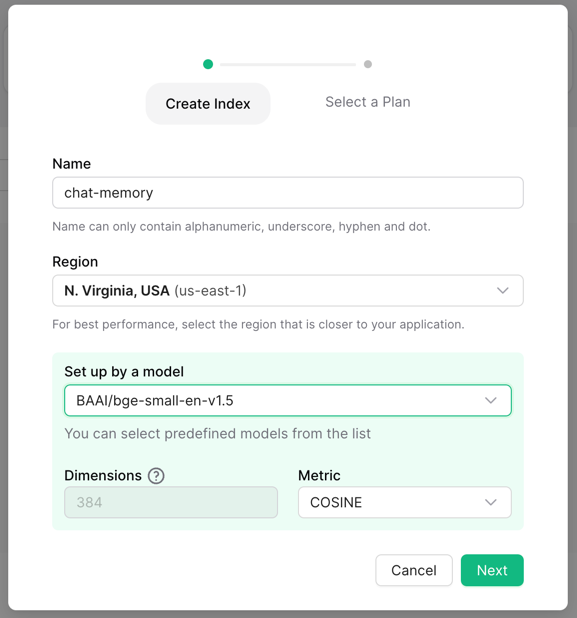 Then, you can start upserting and querying raw text data without any extra
setup.
```shell
curl -H "Authorization: Bearer UPSTASH_VECTOR_REST_TOKEN" \
-d '{"id": "1", "data": "Upstash is a serverless data platform.", "metadata": {"metadata_field": "metadata_value"}}' \
https://UPSTASH_VECTOR_REST_URL/upsert-data
```
```shell
curl -H "Authorization: Bearer UPSTASH_VECTOR_REST_TOKEN" \
-d '{"data": "What is Upstash?", "topK": 1, "includeMetadata": "true"}' \
https://UPSTASH_VECTOR_REST_URL/query-data
```
Then, you can start upserting and querying raw text data without any extra
setup.
```shell
curl -H "Authorization: Bearer UPSTASH_VECTOR_REST_TOKEN" \
-d '{"id": "1", "data": "Upstash is a serverless data platform.", "metadata": {"metadata_field": "metadata_value"}}' \
https://UPSTASH_VECTOR_REST_URL/upsert-data
```
```shell
curl -H "Authorization: Bearer UPSTASH_VECTOR_REST_TOKEN" \
-d '{"data": "What is Upstash?", "topK": 1, "includeMetadata": "true"}' \
https://UPSTASH_VECTOR_REST_URL/query-data
```